Binary File Visualiser
Implementation of a binary file visualiser using Hilbert Curves and Shannon Entropy, based on Aldo Cortesi's works. All of the work presented was done from scratch, using only the information presented in Cortesi's articles and this paper on Hilbert Curves.
Below is a video showcasing some of the features of the program. Primary use-case is in analyzing binary files, so you can view the file byte offset in the top left. You can also swap the 'color palette' or mode using the right panel which allows you to choose between static mapping (pre-selected colours for certain byte value ranges), entropy mapping (visual representation of local Shannon Entropy) and hilbert mapping (same value bytes have the same colour, mapped with sRGB color cube + Hilbert Curve).
If you haven't yet read Aldo's series of articles, I will try to give a (very) brief overview as to how most of this works. All of it stems from a clever observation that files are not random noise, if you were to look at .png, .exe and similar, you'll find that all of them follow a certain structure and that structure can be visualised.
There's a very simple thing you can do by yourself to check that: take every pair of bytes in a file and map that pair's frequency onto a 255x255 grid, you'll notice very interesting structures emerging. This is the first step, but we can do much better by using different methods of traversal through our file, after all, a 255x255 grid won't give us much detail. This is where the idea of using a Hilbert Curve comes in, it is fractal by nature, which allows for infinite* zoom + detail, but it also has a bunch of other properties like preserving locality (visualised below) and can also span other—higher—dimensions.
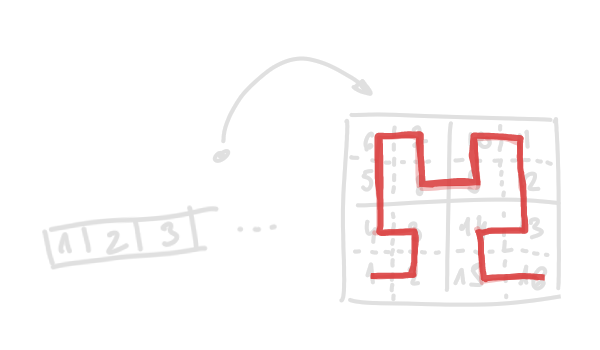
You can think of the above visualisation as '(un)folding a piece of string'.
If you combine these ideas: binary files containing 'hidden' structure which you can visualise and the use of Hilbert Curves' properties, you'll be able to visually inspect different kinds of binary files (every* file on your PC is binary, but you get what I mean) with as much detail as you want while preserving locality (bytes close together in a file are also close in its visual representation). You could also extend this idea to 3D and visualise files' bytes inside of a cube instead.
Again this is just a very brief overview, if you want more details please check the linked articles and videos. This topic is very broad and you can write a lot about it, I just thought it was an interesting thing to implement, while learning more about malware analysis and reverse engineering (and I implore you to do the same).