Drawing Lines With Shaders
Traditional (simple) way of drawing lines is to feed the GPU some vertex data with a 'line primitive'. That's nice and for simple cases works pretty well, it starts to fall apart though when you want to add more effects: better anti-aliasing, variable stroke width, outline etc. Slightly more involved, but much more superior way is to use quads (two triangle primitives) and a bit of clever linear algebra with shaders instead.
Basic Case
Below is a bare minimum WebGL program/sample rendering a line, you feed it two points (start and end of the line), colour and some constant representing thickness, then the shader does the rest. This example doesn't use any geometry shaders (just a standard vertex plus fragment pair) as that would be out of the scope for this simple write-up, but you can certainly use them in nice and creative ways.
This setup is incredibly convenient, it allows for instancing and enables a ton of shader effects, as now you have access to a proper quad. As stated before, you can extend this with geometry shaders to add fancy line joiners, making an equivalent to a 'poly-line' in the process. This small write-up, however, focuses on a very simple case - you just want to draw single/multiple lines in bulk, without worrying too much about how they're joined together (if at all).
Some Maths
Before we do anything on the shader, it's important to understand the underlying math that goes into this. Linear algebra is your friend when programming (not just graphics, but in general) in ~90% of cases. Extending a line from two points, to a four point quad only requires you to understand how to make, normalize and rotate a vector. Below is a helpful, broad-overview diagram of this process, that I'll attempt to explain as we go.
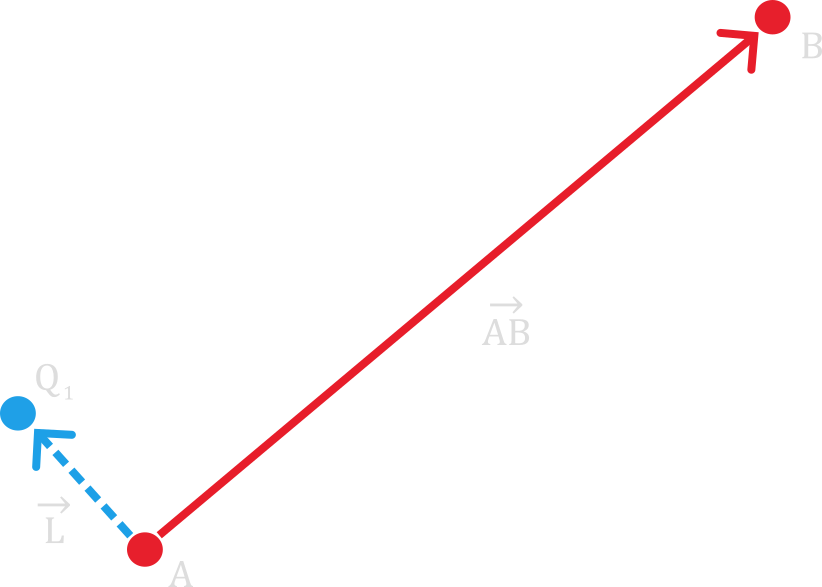
To get from vector \(\vec{AB}\) to \(\vec{L}\) we need to do a couple things. First thing we need to do is create vector \(\vec{AB}\) itself, that just means subtracting point \(A\) from \(B\): \[\vec{AB} = \begin{bmatrix} B_x - A_x \\ B_y - A_y \end{bmatrix}\] Next we normalise this vector, which just means dividing every component of that vector by its length: \[\hat{AB} = \frac{AB}{||AB||}\] Lastly we rotate it by ninety degrees and multiply it by half of thickness \(t\): \[\vec{L} = \begin{bmatrix} -\hat{AB}_y \\ \hat{AB}_x \end{bmatrix} \cdot \frac{t}{2}\] Rotation by ninety degrees simplifies neatly due to rotation matrix's definition. We don't even need to use any trigonometric functions! Now all we need to do to obtain \(Q_N\) point(s), is to just translate the origin of our vector \(\vec{L}\): \[Q_1 = A + \vec{L} \\ Q_2 = A - \vec{L} \\ Q_3 = B + \vec{L} \\ Q_4 = B - \vec{L} \]
Translating the above math to (pseudo)code would produce something similar to this, for obtaining \(\vec{L}\):
// Create vector AB
vec2f AB = vec2f(B.x - A.x, B.y - A.y);

// Normalise
vec2f AB_normalised = norm_vec2f(AB);

// Rotate by 90 degrees
vec2f AB_normalised_rotated = vec2f(-AB_normalised.y, AB_normalised.x);

// Finally scale to get the L vector
vec2f L = AB_normalised_rotated * thickness/2.0f;
And this for obtaining all \(Q_N\) points:
// Getting all 'Q' points
vec2f Q1 = A + L;
vec2f Q2 = A - L;
vec2f Q3 = B + L;
vec2f Q4 = B - L;
That's all the math required... Seriously. This provides a nice way to treat lines as quads (after all, we're converting to them) and enables much more powerful use of shaders (you can texture your lines for example!). There are some caveats when actually implementing this specific approach with just a vertex + fragment shader, but those stem from the API you're using (DirectX, OpenGL, etc.); these require you to specify a different number of 'vertices per instance'. Even though we're providing just 2 points/vertices, we still have to tell the GPU that we want to render 4 and then cleverly use 'VertexID' inside the (vertex) shader to specify where those 4 vertices would end up (that's what the above math is for).
Feel free to look into the code that made the line demo at the start of this write-up possible. It's all the same idea, with slight WebGL magic to make instancing possible.
Short Word on Other Methods
When it comes to other methods of rendering lines, I've already mentioned geometry shaders a couple times - these let you add nice line joiners, making a sort of 'poly-line' in the process. Apart from that you can also use SDFs which, as an added bonus, will naturally connect (somewhat) nicely to other points. If you're really picky you can probably play around with the line primitive configuration on your specific API, but I personally think that's a waste of time in the long run.
I'd also recommend these helpful resources if you want to explore the topic further: Instanced Line Rendering Part 1 and Drawing Lines is Hard.